Shooting volumetric footage with Depthkit and importing it into a Unity scene
Demo Clip
By: Andrew Polino
Work:
Sample Clip
How this was done:
- Used Depthkit setup to film footage of Meghan and Theresa in the Studio
- Used Depthkit Visualize to trim and isolate the clip from its extra foreground/background data
- This rendered into a sequence of .png files which I then exported as an .mp4 file in Premiere
4. Imported the video clip, metadata file from the Depthkit rendering, and a thumbnail of the first frame into Unity.
5. Imported the asset package from this tutorial (NOTE: The package caused compiler errors right out of the box. Had to delete the Sprite Sequence script and remove all references to the 'Sprite Sequence' player from the Clip.cs script.)
6. Added the three assets from step 4 into the DepthKit Prefab with the player set to 'Movie Texture' (had to set the .mp4 file's Import Settings to 'Movie Texture (Legacy)' to make sure it would be recognized in Unity).
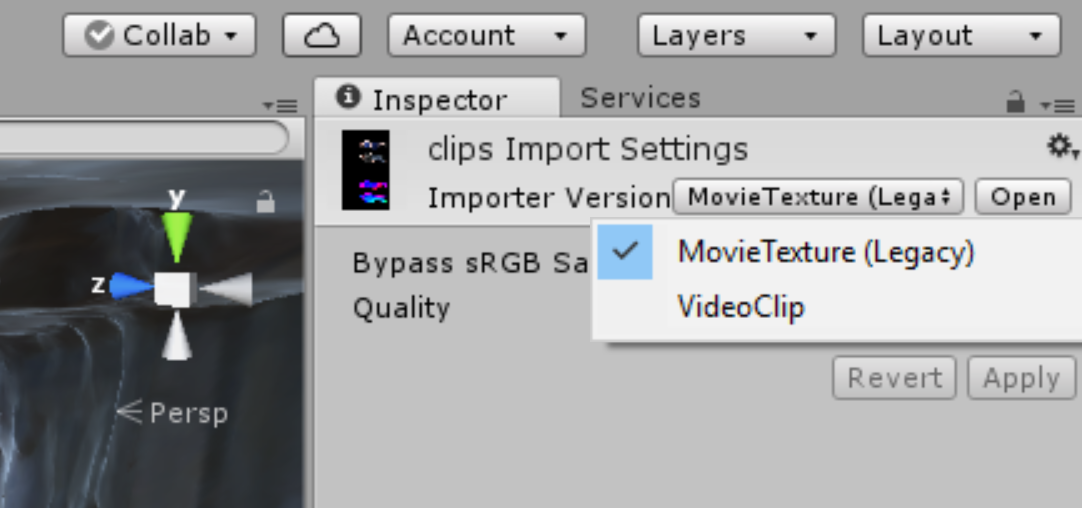
7. Added the Component "Audio Source" to the Prefab so that the audio of the clip (which I synced up with the visual sequence in Premiere) would play along with the video.
8. Added First Person controller and .obj of Video Lab West (c/o Ben)